


When you access devices like the XBee Hive for Wi-SUN using XBee Studio, the system connects under the hood via the standard SSH protocol. Because of this, cryptographic conflicts on your network will manifest as native SSH warnings.
This is very common during testing phases. If you reuse a limited range of IP addresses across multiple modules, you will likely trigger these SSH verification alerts.
While they can look alarming, they are a predictable side-effect of recycling IPs in your environment rather than a security breach.
Understand the root causes
When you connect to a device via SSH, as XBee Studio does with XBee Hive for Wi-SUN, your computer stores its unique cryptographic signature (host key) in a local file called known_hosts.
Poor management of host keys can make XBee Studio show the following warnings:
-
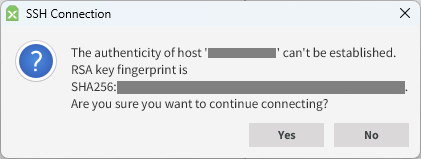
No signature stored for the IP of the device
This warning appears if a device is brand new and has no signature stored on your computer, or if its existing signature is now associated with a different IP address (for example, after changing your device’s IP manually):
-
Host key mismatch (Man-in-the-middle warning)
This occurs when the IP address in your
known_hostsfile is already associated with a different hardware signature from a module that had that same IP address.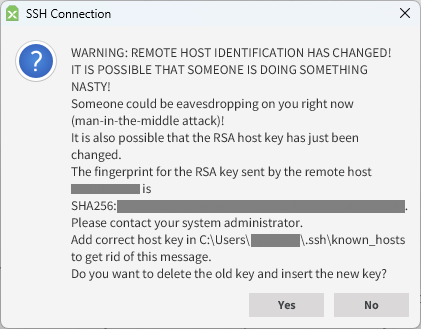
|
While these warnings are common during routine network or hardware changes, they can also indicate a security risk. If you receive either warning unexpectedly (meaning the device has not been replaced, rebooted, or reassigned a new IP address) this could signify a potential threat. If you are uncertain about the cause of the warning, verify the device’s identity with your network administrator before clicking Yes. |
In case these warnings were caused by known sources, you should resolve them before establishing a connection:
Within XBee Studio, you can safely accept these prompts by clicking Yes on the popup dialog, as the application is simply validating your device’s network identity.
If you click No, the connection will be aborted. The device will remain visible in the device browser, marked with a warning icon and a message prompting you to provide your credentials. If you attempt to use them, accept the warnings to complete the connection.
Best practices
To minimize these interruptions during intensive validation cycles, adopt the following network hygiene rules:
-
Maintain an IP inventory: Track assigned addresses to prevent manual assignment collisions across your active testing fleet.
-
Isolate test environments: Use dedicated host machines or localized virtual environments for rapid-cycling hardware setups.
