


The Open Portable Trusted Execution Environment (OP-TEE) is a mini operating system that facilitates the communication between the secure and the normal worlds.
Secure world vs normal world
The Arm TrustZone architecture splits resources in two different execution environments:
-
the secure world: TF-A, OP-TEE
-
the normal world (non-secure): U-Boot, Linux
The concept of the two worlds extends beyond the processor to encompass memory, software, bus transactions, interrupts, and peripherals within an SoC.
The basic rules between the worlds are:
-
The secure world can access any resource from the normal world.
-
The normal world cannot access any resource from the secure world.
Components
Secure world |
|
|---|---|
OP-TEE core |
A secure privileged layer, executed in Arm Cortex-A secure state |
TEE trusted libraries |
A set of secure user space libraries designed for Trusted Applications (TA) |
Normal world |
|
OP-TEE Linux driver |
Linux TEE framework and driver ( |
TEE client API |
A user space library that allows user space applications to communicate with Trusted Applications (TA) running in the secure world. |
TEE supplicant |
A Linux daemon ( |
Workflow
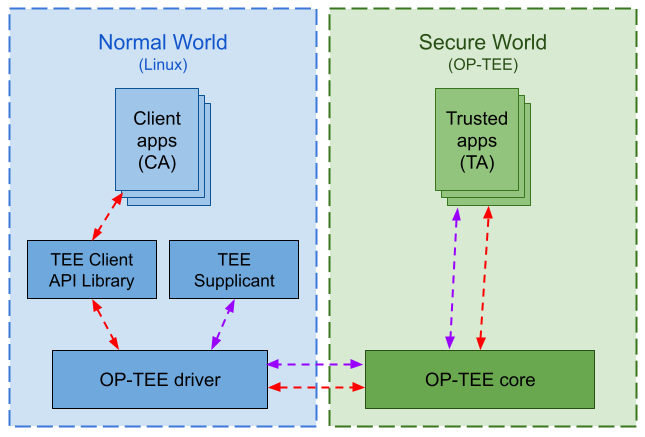
The following diagram represents the communication flow between the normal and the secure worlds:
Source code
The source code for ConnectCore 95 OP-TEE OS is available at https://github.com/nxp-imx/imx-optee-os/tree/lf-6.6.52_2.2.0.
This is forked from the original repo, hosted by Linaro.
This repo contains the SoC customizations by NXP.
Digi customizations for the SOM are provided in the form of patches over the optee-os recipe in meta-digi layer at link:https://github.com/digi-embedded/meta-digi/blob/scarthgap/meta-digi-arm/dynamic-layers/freescale-layer/recipes-security/optee-imx/.
Current supported version is 4.4.0.
Digi Embedded Yocto recipe
The recipe that builds the OP-TEE is called optee-os and belongs to meta-freescale layer.
To build the OP-TEE binary from within a Digi Embedded Yocto project:
$ bitbake optee-os
