


Another capability included in the Digi XBee Mobile application is the possibility to exchange data with the different interfaces of the XBee device you are connected to. This is done through a console, where you define the packets of data to send and see packets coming from the device.
To access this feature, click the Console button from the device home page. The application displays the Console page which is split in two sections, Frames log and Send frames.
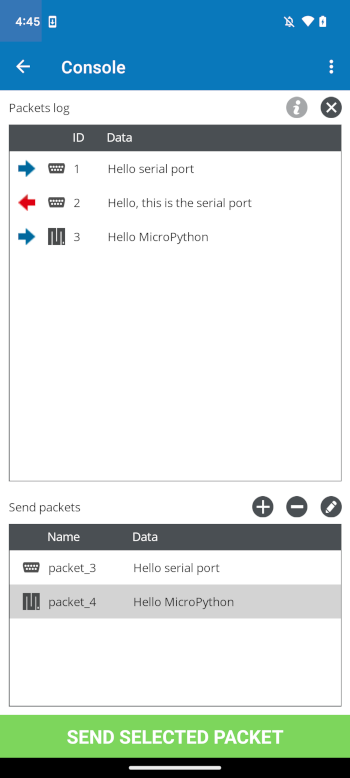
Packets log
The Packets log is the packets traffic monitor. It shows both the sent and received data packets, represented with a blue or red arrow, respectively, the source or destination interface, a unique identifier and the data.
| Button | Name | Description |
|---|---|---|

|
View details |
Opens a popup with the details of the sent/received packets. The View in ASCII switch allows you to change the format of the data, between ASCII and hexadecimal. |

|
Clear log |
Clears the list of sent and received packets. |
Send packets
The Send packets section lists the data packets you have created and allows you to add, remove or edit the existing ones. They are represented with the destination interface, the frame name and the data.
| Button | Name | Description |
|---|---|---|

|
Add packet |
Opens a popup to create and add a new packet. You have to specify the packet name, destination interface and data to send. The View in ASCII switch allows you to change the format of the data, between ASCII and hexadecimal. |

|
Remove packet |
Removes the selected packet. |

|
Edit packet |
Opens a popup to edit the selected packet. |
