


To write the value of a setting:
-
Go to the Settings page from the device home one and select the category containing the setting to write.
-
Tap the setting you want to update. The Details pane displays.
-
Change the value of the setting by entering the new value or by selecting it from its picker control.
-
Tap the Write button of the Details pane (the details pane will hide after writing the setting)
You can also write all the modified settings at once by using the Write all category settings menu item from the top right actions menu.
|
Digi XBee Mobile validates the value of the setting before you write it. If the value to be written is not valid, the setting background color changes to red and the summary of the details pane displays the cause of the problem. 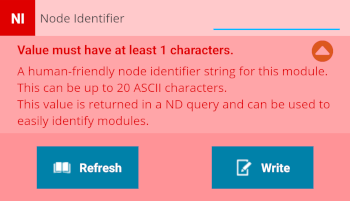
|
