


The XBee Beacon Scan demo demonstrates how to use an XBee device to scan for BLE beacons and extract data from the frames advertised by other BLE devices. This demo highlights the capabilities of the XBee device in proximity detection, passive data collection, and real-time data monitoring, making it applicable to a wide range of scenarios, including smart environments and location-based services.
Demo explanation
In this demo, the Digi XBee Mobile application functions as a BLE beacon, continuously advertising custom data.
Without needing to establish a connection with the Digi XBee Mobile application, the XBee device scans the surrounding area for BLE beacons, captures the advertised data, and prints it through the serial port.
Execute the demo
The XBee Beacon Scan home page includes a diagram of the demo, a short description and the steps required to test the demo.
Follow these instructions to execute the XBee Beacon Scan demo:
-
Apply the XBee Beacon Scan Quick Setup to your XBee module using XBee Studio. For more information about Quick Setups and how to apply them, refer to the Quick Setup chapter of the XBee Studio User Guide.
-
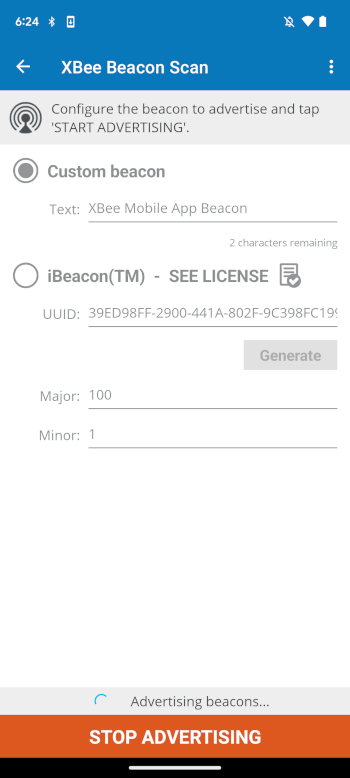
Tap the Configure frame button in Step 2 (Advertise data). The XBee Beacon Scan - Main page displays.
-
Select the type of beacon frame to advertise and fill in all the options.
Depending on the operating system of your smartphone (Android or iOS) you can choose between advertising custom beacon frames or iBeacon frames. The MicroPython application running on your XBee device recognizes both types. -
Tap START ADVERTISING to begin broadcasting data.
-
After a few seconds, the MicroPython application running on your XBee device should recognize the beacon and display the information about it in the MicroPython Terminal of XBee Studio:
- Custom Digi beacon found: 02010219ffdb0258426565204d6f62696c652041707020426561636f6e - Source address: 58:4e:83:98:af:4a - Text: XBee Mobile App Beacon - RSSI: -45 -
You can modify the data being broadcasted by:
-
Tap STOP ADVERTISING to stop broadcasting data.
-
Perform the desired changes.
-
Tap START ADVERTISING to begin broadcasting data.
-
| iBeacon™ is a trademark of Apple Inc. The iBeacon functionality included in the XBee Mobile app is provided solely for evaluation and demonstration purposes. This demo is not intended for commercial use and is not endorsed by or affiliated with Apple Inc. |
