


An API frame is a structured data packet used for communication between an external device and an XBee device configured in API operating mode, typically found in hosted and hybrid architectures.
| In scenarios where there is no external microcontroller (hostless setups), communication with the XBee device isn’t necessary, as the MicroPython application running on the XBee handles all wireless data transmission. |
API frames are transmitted and received through the serial interface of the XBee and contain not only the wireless message but also additional metadata, such as the destination and source addresses, signal quality, and command types.
Each API frame is designed to define specific operations or events within the module, enabling more advanced and controlled communication compared to simpler modes. This structured approach allows for features like addressing, acknowledgments, and remote configuration, making API mode particularly powerful for complex solutions.
| XBee Studio includes an embedded tool called API Frames that helps you to generate and decode any kind of API frame. See XBee Studio User Guide for more information. |
Structure
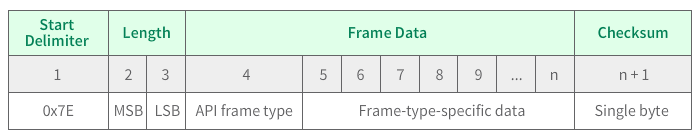
An API frame has the following structure:
| Any data received through the serial interface prior to the start delimiter is silently discarded by the XBee device. |
Start delimiter
The first byte of a frame consists of a special sequence of bits, which indicate the beginning of an API frame. Its value is always 0x7E. This allows for easy detection of new incoming frames.
Escaped Characters in API Frames
If operating in API mode with escaped characters (AP parameter = 2), when sending or receiving a serial data frame, specific data values must be escaped (flagged) so they do not interfere with the data frame sequencing.
The following data bytes need to be escaped:
-
0x7E: start delimiter
-
0x7D: escape character
-
0x11: XON
-
0x13: XOFF
The following example illustrates how to escape an API non-escaped frame.
The following is an non-escaped API frame that contains some bytes that need to be escaped:

To escape the frame you must escape all of the 0x7E bytes by:
-
Inserting a 0x7D before each of them
-
XOR the 0x7E bytes with a 0x20: 7E ⊕ 20 = 5E
The following figure shows the resulting frame.

| The length and checksum are the same as the non-escaped frame. The reason is that in API mode with escaped characters, the length field does not include any escape characters in the frame and the firmware calculates the checksum with non-escaped data. |
Length
The length field specifies the total number of bytes included in the frame data field. Its two-byte value excludes the start delimiter, the length, and the checksum.
Frame data
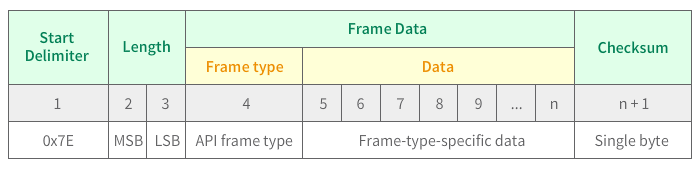
This field contains the information to be sent to the XBee device or received from it. Frame data is structured based on the purpose of the API frame:
-
Frame type: Is the API frame type identifier. It determines the type of API frame and indicates how the information is organized in the Data field.
-
Data: Contains the data itself. The information included here and its order depend on the type of frame defined in the Frame type field.
Checksum
To ensure data integrity, each API frame includes a checksum (last byte of the frame) calculated on the non-escaped data.
The following example illustrates how a checksum is calculated and how it can be verified.
Consider the following sample data packet:
7E 00 08 08 01 4E 49 58 42 45 45 3B| Byte(s) | Description |
|---|---|
7E |
Start Delimiter |
00 08 |
Length |
08 |
Frame type |
01 |
Frame ID |
4E 49 |
AT command |
58 42 45 45 |
Parameter value |
3B |
Checksum |
To calculate the checksum of this API frame:
-
Add all bytes of the packet except the start delimiter 0x7E and the two length bytes. This is the important part of the frame: 7E 00 08 08 01 4E 49 58 42 45 45 3B
0x08 + 0x01 + 0x4E + 0x49 + 0x58 + 0x42 + 0x45 + 0x45 = 0x01C4 -
Keep only the lowest 8 bits from the result: 0xC4 (the two far right digits).
-
Subtract 0xC4 from 0xFF to get the checksum of the packet: 0x3B (0xFF - 0xC4 = 0x3B).
To verify the checksum of this API frame:
-
Add all bytes including the checksum; do not include the delimiter and length.
0x08 + 0x01 + 0x4E + 0x49 + 0x58 + 0x42 + 0x45 + 0x45 + 0x3B = 0x01FF -
If the checksum is correct, the least significant byte of the sum equals 0xFF (last two digits on the far right).
| Frames sent through the serial interface with incorrect checksums will never be processed by the XBee device and the data will be ignored. |
What API frames can I use?
Depending on the purpose of the communication with your XBee device, the available API frames fall under these categories:
