Connect EZ 16/32 component list
Verify that you have the following included equipment.
Included equipment for Connect EZ 16/32
These components are included in the box.
| Equipment | Description |
|---|---|
|
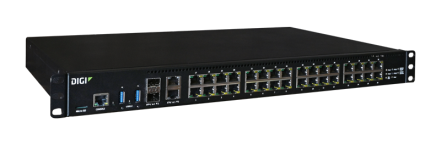
Connect EZ 16 Connect EZ 32 |
Note This image is of Connect EZ 32. The Connect EZ 16 has a blank panel covering the top row of serial ports. For detailed information about the panels, see: |
| Ethernet cable |
RJ45 Ethernet cable Connect to a site network using an Ethernet cable. See Connect to site network using an Ethernet LAN. |
| Console Adapter |
RJ45F to DB9F RS232 Serial adapter. Connect the console adapter to a straight-through RJ45 cable, and then connect that cable to the Console port on the front of the device. |
| Mounting bracket |
The Connect EZ 16/32 ships with rack mount ears pre-attached. For mounting instructions, see Mount the Connect EZ 16/32 on a rack. |
| Loopback cable | RJ45M serial loopback cable is included for use with testing. |
| Loose label |
A loose label sticker that includes information about the device is included in the box. You should retain this label sticker with your hardware records. For more information about the label, see Device label sticker sample. Note This label includes the unique default password for the device. This unique password will be needed if the device is factory reset and you want to access the web UI on the device. |
Additional required equipment
| Equipment | Description |
|---|---|
|
Power cord |
A national mains power cord. Depending on the device variant ordered, a power cord may be supplied. At least one is required to power the device. If your device is dual-powered, a second power cord is recommended. For AC power supplies: Use an appropriate power cable meeting national standards to connect to a standard outlet.
For information about connecting the power supply, see Power the Connect EZ 16/32. |
Optional additional equipment
| Equipment | Description |
|---|---|
| Power supply unit |
Each Connect EZ 16/32 has one power supply installed by default. You can order a dual-powered device with two power supplies installed by default, or you can purchase a second power supply unit and install it.
|
Optional additional cellular equipment
These items are only needed if you are using a CORE module to connect to a cellular network.
For more information, see Create a cellular connection using the CORE module.
| Equipment | Description |
|---|---|
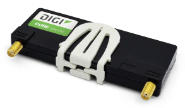
| CORE module |
Note A SIM card is also required. |
| SIM card |
An activated SIM card provided by your cellular network operator. You can insert up to two SIM cards in the CORE module. See Create a cellular connection using the CORE module. The CORE module supports the standard mini-SIM cards (2FF). |
| LTE Antenna (2) |
Up to two LTE antennas can be attached. See Create a cellular connection using the CORE module. |
 PDF
PDF


