AnywhereUSB 24 Plus: Back panel
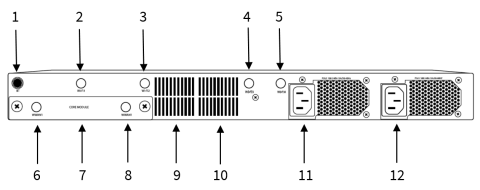
| Item | Name | Description |
|---|---|---|
|
1 |
BT |
Reserved for future use. |
|
2 |
Wi-Fi1 |
Reserved for future use. |
|
3 |
Wi-Fi2 |
Reserved for future use. |
|
4 |
Wi-Fi3 |
Reserved for future use. |
|
5 |
Wi-Fi4 |
Reserved for future use. |
|
6 |
WWAN2 |
Attach a cellular module antenna. |
|
7 |
CORE module |
Insert a CORE module component. |
|
8 |
WWAN1 |
Attach a cellular module antenna. |
|
9 |
The CPU Fan 1 runs when the Hub is powered by one or both of the power supply units. The FAN1 LED on the front of the Hub shows the status of the Fan 1. Note Two CPU fans are installed in the Hub. The CPU fans work independently and one is not dominant over the other. In addition, a fan is included in each power supply unit. For more information about the CPU and PSU fans, see Internal fans overview: AnywhereUSB 24 Plus. |
|
|
10 |
The CPU Fan 2 runs when the Hub is powered by one or both of the power supply units. The FAN2 LED on the front of the Hub shows the status of the Fan 2. Note Two CPU fans are installed in the Hub. The CPU fans work independently and one is not dominant over the other. In addition, a fan is included in each power supply unit. For more information about the CPU and PSU fans, see Internal fans overview: AnywhereUSB 24 Plus. |
|
|
11 |
Power supply unit. For instructions on connecting the power supply, see Connect the power supply. The PSU2 LED on the front of the Hub shows the status of the PSU2 power supply unit. Note Two power supply units are included in the AnywhereUSB 24 Plus Hub. Only one power supply unit and power cord is required to power the Hub. However, Digi recommends that you purchase and connect an additional power cord to the other power supply unit. For more information about this recommendation, see Power supply unit (PSU) overview. |
|
|
12 |
Power supply unit. For instructions on connecting the power supply, see Connect the power supply. The PSU1 LED on the front of the Hub shows the status of the PSU1 power supply unit. Note Two power supply units are included in the AnywhereUSB 24 Plus Hub. Only one power supply unit and power cord is required to power the Hub. However, Digi recommends that you purchase and connect an additional power cord to the other power supply unit. For more information about this recommendation, see Power supply unit (PSU) overview. |
 PDF
PDF


