


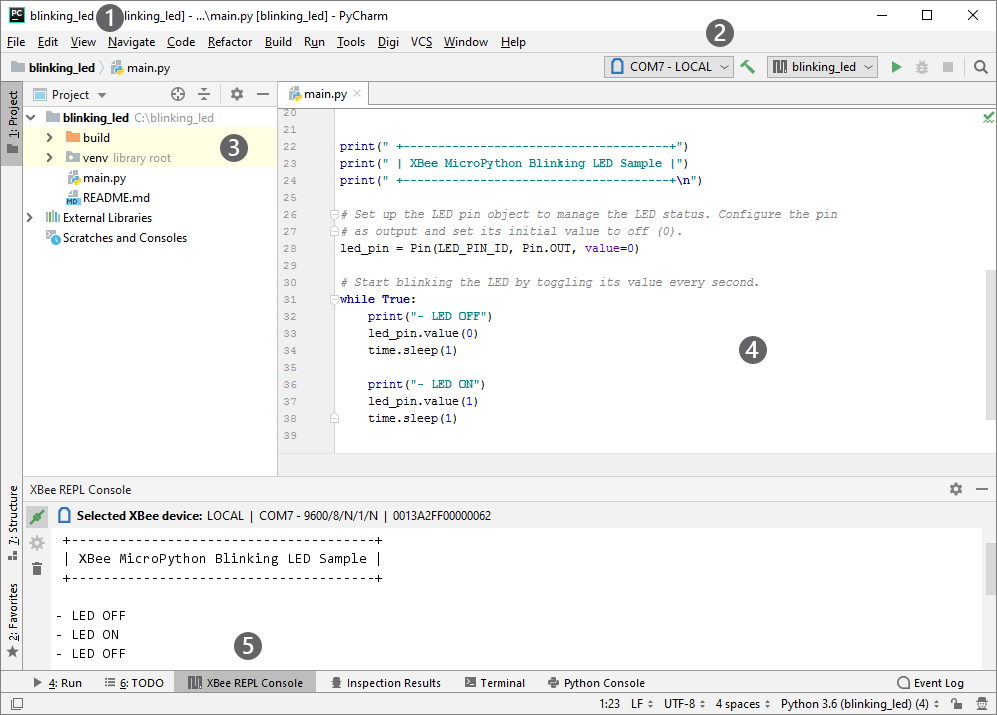
The Digi XBee PyCharm IDE Plugin adds some new elements to the PyCharm UI in order to facilitate the development of Python or MicroPython applications.
-
Main menu:
-
The File menu includes two new options to create a Digi project and to import a Digi sample.
-
The new Build menu allows you to build the project, generating the corresponding compiled files for each Python/MicroPython source, and clean the project.
-
The new Digi menu offers actions to open the REPL or SSH consoles, import a library, reset the selected XBee device or format the XBee file system. Some of these options only appear depending on the selected platform.
-
-
Navigation bar: It allows you to select or change the Digi device where the application will be flashed into, build the project and run it.
-
Project view: The build and libs folders are automatically created. The first one contains the Python/MicroPython compiled files, and the second one the libraries you have imported—if any.
-
Editor: The plugin provides some features that help you to write your code.
-
Tool Window bar: The XBee REPL Console and Digi SSH Console tools allow you to quickly communicate with your Digi device.
| For more information about the IDE, see the PyCharm Quick Start Guide. |
