


To download and install the Digi XBee MicroPython PyCharm Plugin, see the following requirements and installation steps.
Requirements
-
A computer with the following characteristics:
-
64-bit operating system:
-
Microsoft Windows 10, 8, 7 (SP1)
-
macOS 10.11 or later
-
Linux
-
-
4 GB RAM minimum, 8 GB RAM recommended.
-
1.5 GB hard disk space + at least 1 GB for caches.
-
1024x768 minimum screen resolution.
-
-
PyCharm 2025.3.0 or higher.
-
Python 3.6 or higher.
Supported devices
- XBee modules
-
-
Digi XBee 3 Cellular LTE CAT 1 AT&T
-
Digi XBee 3 Cellular LTE CAT 1 Verizon
-
Digi XBee 3 Cellular LTE-M/NB-IoT
-
Digi XBee 3 Global LTE Cat 1
-
Digi XBee 3 North America LTE Cat 1
-
Digi XBee 3 Global LTE-M/NB-IoT
-
Digi XBee 3 Global LTE-M/NB-IoT Low Power
-
Digi XBee 3 Global LTE Cat 4
-
Digi XBee 3 North America LTE Cat 4
-
Digi XBee 3 Zigbee 3
-
Digi XBee 3 DigiMesh 2.4
-
Digi XBee 3 802.15.4
-
Digi XBee BLU
-
Digi XBee for Wi-SUN
-
- XBee gateways
-
-
Digi AnywhereUSB 2/8/24
-
Digi Connect EZ Mini
-
Digi Connect EZ 2
-
Digi Connect EZ 4
-
Digi Connect EZ 8
-
Digi Connect EZ 16/32
-
Digi Connect IT Mini
-
Digi Connect IT 4
-
Digi Connect IT 16/48
-
Digi EX12
-
Digi EX15/EX15W
-
Digi EX50
-
Digi IX10
-
Digi IX15 XBee Gateway
-
Digi IX20/IX20W
-
Digi IX30
-
Digi LR54/LR54W
-
Digi TX54
-
Digi TX64
-
Digi TX64 Rail
-
Digi XBee Hive for Wi-SUN
-
Digi XBee Hive
-
Install the plugin
Install the Digi XBee PyCharm IDE Plugin from the PyCharm’s plugins marketplace:
-
Open PyCharm.
-
Go to the Plugins window by doing one of the following:
-
Select Configure > Plugins if you are on the Welcome screen, or
-
Select File > Settings > Plugins if you have a project open.
-
-
Type Digi XBee in the Marketplace search box.
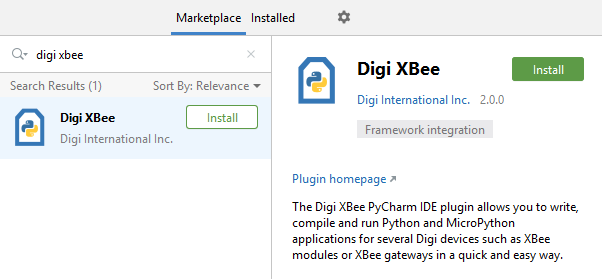
-
Click Install.
-
When finished, click Restart IDE to complete the plugin installation.
