

Depending on the goal and purpose of your solution, you may need one or more of the following requirements to use the Digi IoT Library for .NET MAUI to develop applications that communicate with Digi IoT devices:
-
Visual Studio with .NET MAUI. Used to develop the cross-platform mobile application.
-
ConnectCore Bluetooth® Low Energy Python library. Used to develop the Python application that runs in a ConnectCore device.
-
XCTU. Used to configure the Bluetooth Low Energy interface of the XBee devices.
-
Digi XBee Mobile. Required for test purposes. This application can be used to send and receive data over Bluetooth Low Energy with an XBee device.
Visual Studio with .NET MAUI
Microsoft Visual Studio is an integrated development environment (IDE) from Microsoft used to develop computer programs web apps, web services, and cross-platform apps.
.NET Multi-platform App UI (.NET MAUI) is a cross-platform framework for creating native mobile and desktop apps with C# and XAML. You can use .NET MAUI to develop apps that run on Android, iOS, macOS, and Windows from a single shared codebase.
Follow these steps to download and install Visual Studio with .NET MAUI support in your computer:
-
Download the Community edition of Visual Studio.
-
Execute the downloaded package to start the installation.
-
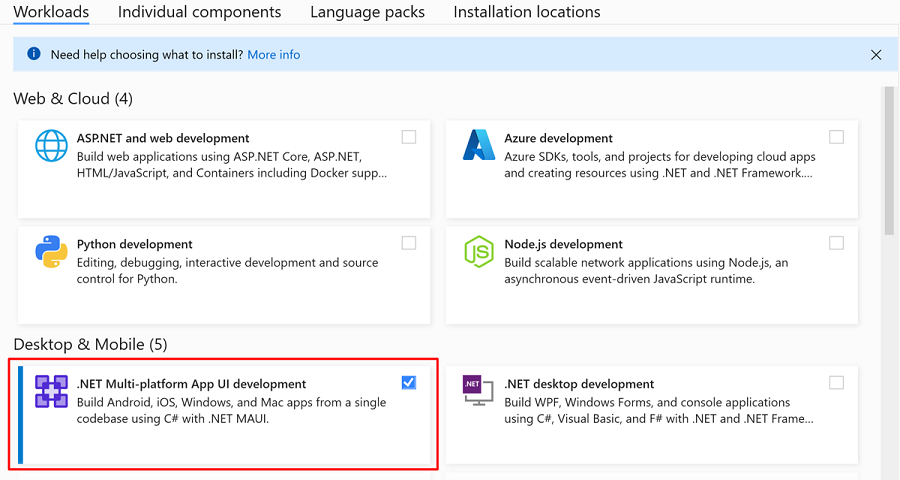
In the installation screen, select the .NET Multi-platform App UI development workload.
-
Click the Install button in the lower right corner to begin the installation. The installation process can take several minutes to an hour.
-
When the installation completes, click the Launch button to start Visual Studio.
ConnectCore Bluetooth® Low Energy Python library
The ConnectCore Bluetooth® Low Energy Python library is an easy-to-use API that facilitates the development of Python apps for ConnectCore devices that require Bluetooth Low Energy interaction with mobile apps.
Some examples from the Digi IoT Library for .NET MAUI require you to execute code located in the ConnectCore Bluetooth® Low Energy Python Library. You can get the latest version of the library from its official GitHub repository.
XCTU
XCTU is a free multi-platform application that enables developers to interact with Digi RF modules through a simple-to-use graphical interface. It includes new tools that make it easy to set up, configure, and test XBee RF modules.
This application is used to test and interact with the examples provided by the Digi IoT Library for .NET MAUI.
Follow these steps to install XCTU in your computer:
-
Go to https://www.digi.com/xctu.
-
Click the Download XCTU button.
-
Click the link with latest version of the tool to download the installer file.
-
Execute the downloaded package to start the installation.
-
Follow the guided steps of the installer to finish the installation.
Digi XBee Mobile
Digi XBee Mobile is an iOS and Android compatible app that allows you to connect and configure Digi XBee 3 devices with Bluetooth Low Energy support.
This mobile application is used to test and interact with the examples provided by the Digi IoT Library for .NET MAUI. The application itself has been developed using this library.
You can install the application from:
You can also scan the following QR to download the application from the corresponding market: