


| The ConnectCore 91 SOM does not have a corresponding development kit (DVK). This Get Started guides you on how to emulate a ConnectCore 91 using a ConnectCore 93 Development Kit instead. |
Follow these steps to set up a ConnectCore 93 DVK for evaluating your ConnectCore 91.
Run serial console setup script
| You only need to complete this step if you are running Linux. If so, you may need to install a driver for the serial interface of the ConnectCore 93 Development Kit. |
-
Download the script for the USB-to-serial driver.
-
Give execution permission to the file in your computer and run it as administrator.
$ chmod +x install_usb_driver.sh
$ sudo ./install_usb_driver.sh

Installing Cypress USB driver.
Rule "/etc/udev/rules.d/90-cyusb.rules" doesn't exist, creating a new one.
File "/etc/modprobe.d/blacklist.conf" exists, checking if the rule is already there.
Rule for cytherm not found. Adding cytherm to the blacklist.
Please plug/unplug your usb device to be recognized.
Connect the hardware
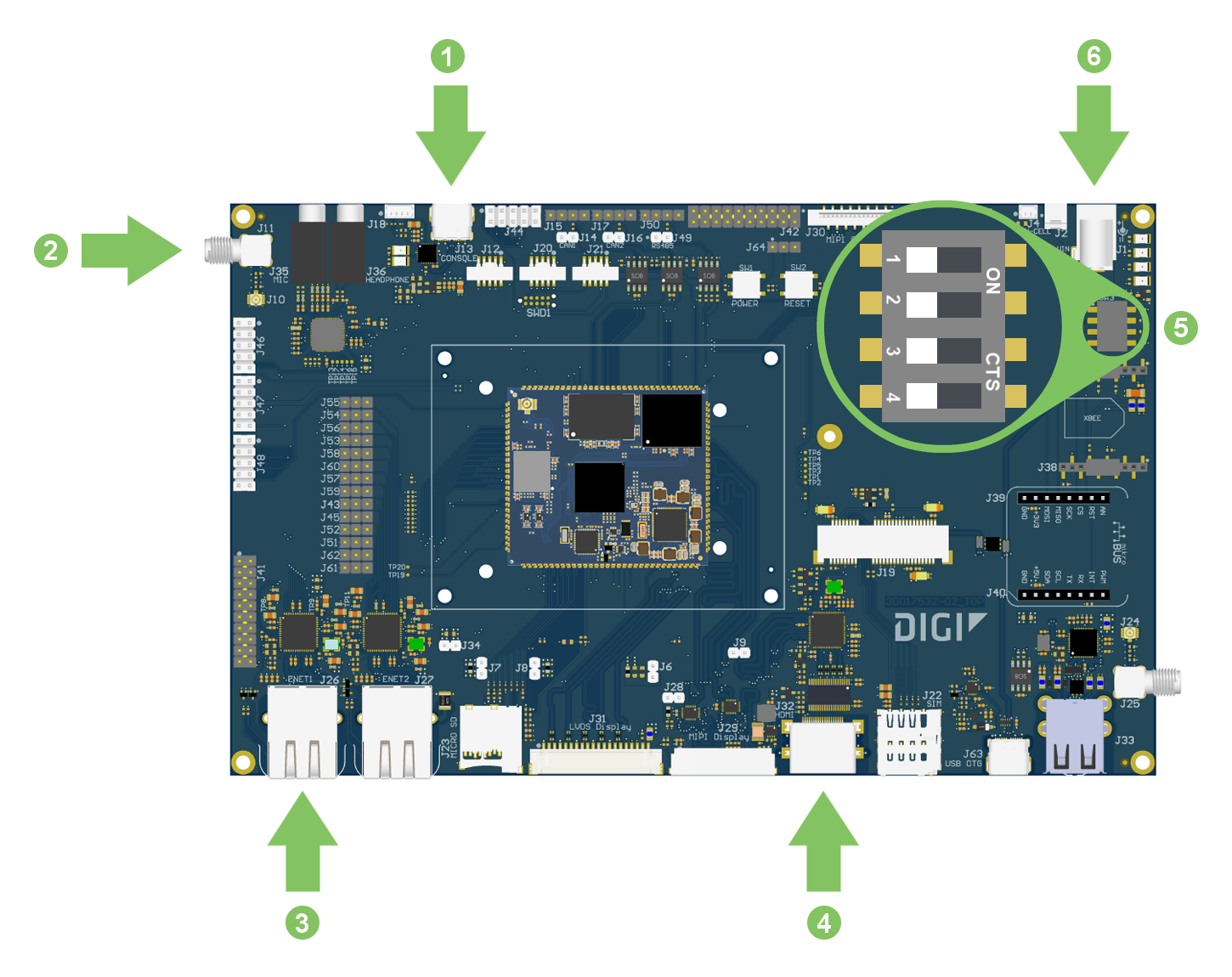
| The following image shows a ConnectCore 93 DVK, which is the development board for evaluating the ConnectCore 91 SOM. |
-
Connect the USB type-C cable to the USB CONSOLE connector on the board and to your host computer if it isn’t already done.
-
Connect the Wi-Fi antenna to the SMA antenna connector.
-
Connect the Ethernet cable (not included) to the Ethernet port.
-
Make sure the boot micro-switches (SW3) are set to boot from the eMMC:
-
Connect the 5V/3A power supply to the power connector. First connect the power supply to a power cord (not included).

