Connect EZ 8 component list
The components needed to connect and configure the Connect EZ 8 are listed in the tables below.
Included equipment for Connect EZ 8
These components are included in the box.
| Equipment | Description |
|---|---|
|
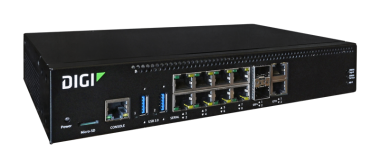
Connect EZ 8 |
For detailed information about the panels, see: |
|
Power supply |
A power supply that connects to the device. For information about connecting the power supply, see Power the Connect EZ 8. Digi part number 76002159. Note A power cord is needed to complete the connection to the mains power source. |
| Power cord |
Power cord that connects to the power supply and to the mains power source. Note A power cord is included based on the SKU, so many not be included. If a power cord is not included, you need to provide one to complete the power connection. |
| Ethernet cable |
RJ45 Ethernet cable. |
| Console Adapter |
RJ45F to DB9F RS232 Serial adapter. Connect the console adapter to the Console port on the front of the device. |
| Mounting bracket kit |
Use the mounting bracket kit to mount the Connect EZ 8 on a rack. The kit contains two (2) L-shaped brackets and eight (8) screws. |
| Rubber feet |
A set of four rubber feet are included. Attach the feet to the bottom of the device, in the locations indicated by a circle on each corner of the device. Note The rubber feet are intended for desktop use only. Do not attach the feet if you intend to mount the device on a rack. |
| Loopback plug | RJ45M serial loopback plug is included for use with testing. |
| Digitial I/O Connector |
Attach to the Analog and digital I/O port on the front of the device. For configuration information, see Digital Input/Output and Analog Input. Note This is available only on the Connect EZ 8 I/O model (EZ08-D100) and the Connect EZ 8 I/O with ETH Switch model (EZ08-E100). |
| Loose label |
A loose label sticker that includes information about the device is included in the box. You should retain this label sticker with your hardware records. For more information about the label, see Device label sticker sample. Note This label includes the unique default password for the device. This unique password will be needed if the device is factory reset and you want to access the web UI on the device. |
Included only with Wi-Fi devices
| Equipment | Description |
|---|---|
|
Wi-Fi antenna |
Two Wi-Fi antennas.
|
Optional additional cellular equipment
These items are only needed if you are using a CORE module to connect to a cellular network.
For more information, see Create a cellular connection using the CORE module.
| Equipment | Description |
|---|---|
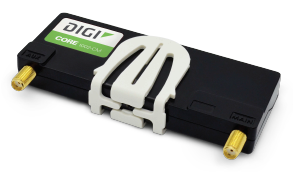
| CORE module |
Note A SIM card is also required. |
| SIM card |
An activated SIM card provided by your cellular network operator. You can insert up to two SIM cards in the CORE module. See Create a cellular connection using the CORE module. The CORE module supports the standard mini-SIM cards (2FF). |
| LTE Antenna (2) |
Up to two LTE antennas can be attached. See Create a cellular connection using the CORE module. |
Optional additional cellular equipment
| Equipment | Description |
|---|---|
| SFP+ modules |
Up to two SFP+ modules can be connected to the Connect EZ 8. See Connect SFP+ modules. Note This is available on all models except for the Connect EZ 8 model (EZ08-A100). |
 PDF
PDF


