Location pins on the Digi Axess map
Devices that have latitude and longitude coordinates assigned are noted with a location pin on the Digi Axess map.
Assigning coordinates
The latitude and longitude coordinates can be assigned manually or automatically.
Manually
You can assign the coordinates to the device from the web UI.
Automatically
The coordinates are assigned using the GPS on the device.
The device must have a cellular connection
Location pin color
The color of the location pin shows the status of the location. The color is determined by the Location Status items, which are a set of metrics tracked by the firmware.
-
Red: At least one of the Location Status items is red.
-
Yellow: At least one of the Location Status items is yellow. The rest may be green or yellow, but none are red.
-
Green: All of the Location Status items are green.
-
Gray: The device has not connected to Digi Axess within the last 24 hours.
Location pin with a blue center
A location pin has a blue center if the device has an Automation input configured that evaluates either a threshold or an on/off state, and is then received by Digi Axess from the device. The input configuration is user-defined.
Hover over a location pin
When you hover over a location pin on the map, a dialog that shows information about the location displays: the latitude and longitude of the location, and the location name and status.
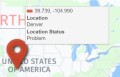
| Item | Description |
|---|---|
| Color bar |
Denotes the status of the location, which matches the location pin color. |
| Coordinates |
The latitude and longitude of the device's physical location. If the Z45 Controller has a cellular network connection, the coordinates can be determined using the GPS on the device. You can also manually assign a latitude and longitude. |
| Location Name | The name assigned to the device. |
| Location Status |
The status of the location, which coordinates with the color assigned to the location pin. The location status is determined by the Location Status items, which are a set of metrics tracked by the firmware.
|
Click a location pin
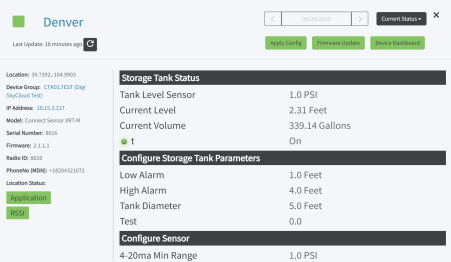
Click a location pin to display the Device Summary page with status information about the device. For information about this page, see Review device status information in the Device Summary page.
 PDF
PDF


