Create or edit an MQTT configuration from the device's web UI
You can create a new MQTT device group configuration from the MQTT Configuration page, or update selected configuration.
Note The MQTT option is available only if firmware version 4.2.1.26 or above is installed on the device. You can review the current firmware version installed on the device and update the firmware if needed.
Create an MQTT device group configuration
-
Access the web UI for Connect Sensor from the Device Summary page. The Automation Dashboard displays.
-
Choose Services > MQTT. The MQTT Configuration page displays.
-
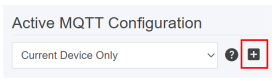
Click the plus icon to launch a new browser window. The MQTT Configuration page displays in the Digi Axess Administration dashboard.
-
Create and save a new device group MQTT configuration.
-
When complete, close the Digi Axess Administration dashboard browser window and return to the browser window for the web UI MQTT Configuration page.
-
Select the MQTT configuration you just created.
-
Click Update to save the selection.
Edit an MQTT device group configuration
-
Access the web UI for Connect Sensor from the Device Summary page. The Automation Dashboard displays.
-
Choose Services > MQTT. The MQTT Configuration page displays.
-
From the Active MQTT Configuration list box, select a device group MQTT configuration option. The MQTT Configuration page is updated to show the device group MQTT configuration.
-
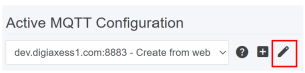
Click the pencil icon to launch a new browser window. The MQTT Configuration page displays in the Digi Axess Administration dashboard, showing the configuration for the MQTT configuration you selected.
-
Update the configuration as needed.
-
When complete, close the Digi Axess Administration dashboard browser window and return to the browser window for the web UI MQTT Configuration page.
-
Click Update to save the change.
 PDF
PDF


