Register a Connect Sensor device
Your device must be registered with Digi Axess so that you can access and manage the device from Digi Axess. The process uses the device's IMEI as a unique identifier.
Note You can also register devices from the Devices page.
Before you begin
You will need this information to register your device:
-
The device's IMEI, which is printed on the device label.
-
The device group in which the device should be included.
To register your device:
-
Access the Digi Axess Register Device page.
-
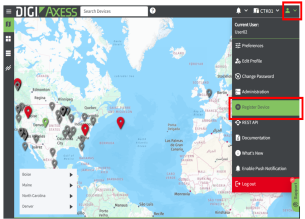
In the toolbar, click the down arrow next to the user profile icon. The Account menu displays.
-
Click Register Device. The Register Device page displays.

-
-
In the Serial Number field, enter the device's IMEI, which is printed on the device label. As an alternative, click the Scan Barcode button next to the field and use a camera or a saved image to enter an identifier.
-
From the Device Group list box, select a device group from the drop-down list.
-
(Optional) In the Subgroup field, enter a subgroup name.
-
Click Register. The Set Device Location Source page displays.
-
Name and define the device's physical location.
-
In the Location Name field, enter a descriptive name for the device's physical location. If you leave this field blank, the device's serial number is used by default.
-
Select a Location Source option, which defines the method used to configure the physical location for the device.
-
None: No physical location is defined. The device is unmapped and won't appear on the Digi Axess map. You can specify a location at a later time.
-
Manual: Manually enter the latitude and longitude of the physical location of the device.
-
GPS: The physical location is determined by the device's internal GPS. The location is updated the next time the device wakes and connects to Digi Axess.
-
-
-
In the Set Device Configuration page, from the Choose a Configuration list box, select an initial configuration for the device.
-
Demo Configuration: This is the default configuration, and displays basic information in the Device Summary page: Analog in Voltage, Digital in, and Case Temperature.
-
Blank Configuration: No data displays. You must manually configure the device in the device's Administration page.
-
Saved Configuration: Select a configuration that you have previously created and saved. The configuration is applied to this device.
-
-
Click Set to save your selections.
-
Verify that the location and configuration selections are available. You need to wake the device, and when the device connects to Digi Axess, the configuration is pushed from Digi Axess to the Connect Sensor device.
For detailed information, see Verify device registration.
 PDF
PDF


