Delete an OpenVPN Connect user profile from your computer
You can delete a user profile from the OpenVPN Connect client installed on your computer.
Note If you have the same use profile configured on both your computer and your mobile device, you must delete the profile from both. See Delete an OpenVPN Connect user profile from your mobile device.
-
Open the OpenVPN Connect client on your computer.
-
Make sure that a user profile is not is not connected to the network.
-
Connect: If you see the Connect button, you are not connected and can proceed.
-
Disconnect: If you see the Disconnectbutton, you are connected. Click Disconnect. A confirmation dialog may display. If it does, click Disconnect in the confirmation dialog.
-
-
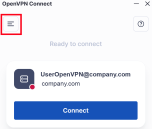
In the OpenVPN Connect page, click the menu button to display the menu options.
-
Click the My Profiles menu option. The My Profiles page displays.
-
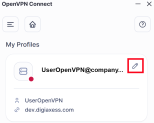
Click the Edit icon next to the profile you want to delete. The profile settings display.
-
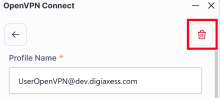
Click the Delete icon in the top right corner of the page.
-
A confirmation dialog displays. Click Delete to complete the deletion.
 PDF
PDF


