Create an SSO password
If you use Digi Axess Mobile app
You can generate up to 5 passwords. The password description and the date and time the password was generated and last used display in the Update Profile page. You can also delete a password if needed.
When the password is generated, copy the password and save it so that you can retrieve it when needed. This password will only be shown once and you will not be able to see it again.
-
Access the Digi Axess Admin page. You must have Admin or Device User privileges to access this page.
-
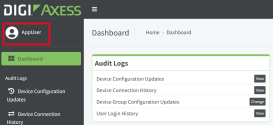
Click your user name next to the user icon in the upper left corner of the screen.
-
The Update Profile page displays.
-
Click the Security tab if it is not already selected.
-
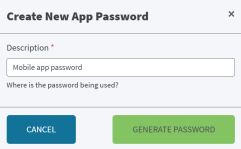
In the Application Passwords section, click Create New App Password. The Create New App Password dialog displays.
-
In the Description field, enter a description of where you will use the password.
-
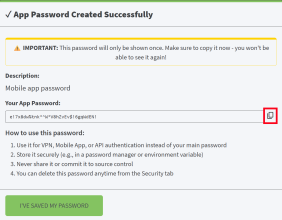
Click Generate Password. The password is generated and the app password dialog displays.
-
Click the Copy to Clipboard icon next to the Your App Password field. This saves the password to your mobile device's clipboard.
Make sure to copy the password. This is your only opportunity to view and copy the password.
-
Paste the password from the clipboard to a location from which you can retrieve the password.
-
After you have copied and saved your password, click I've saved my password. The Update Profile page updates and information about the password you created displays in the Application Password section.
 PDF
PDF


