Delete a generated SSO password
You can delete a generated SSO password if needed.
Note Be aware that after you delete an SSO password, any applications using this password will no longer be able to authenticate.
-
Access the Digi Axess Admin page. You must have Admin or Device User privileges to access this page.
-
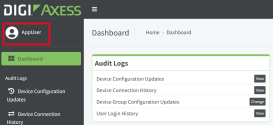
Click your user name next to the user icon in the upper left corner of the screen.
-
The Update Profile page displays.
-
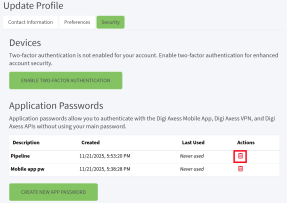
Click the Security tab if it is not already selected. A list of generated passwords displays in the Application Passwords section of the page.
-
Click the Delete app password icon in the Actions column for the password that you want to delete. A confirmation dialog displays.
-
Click OK. The page updates and a green banner with the message "App password deleted successfully" displays.
 PDF
PDF


