Add a user profile to OpenVPN Connect from your computer
You can have more than one OpenVPN Connect user profile configured on your computer. This section explains how to add an additional profile.
Before you begin
-
You will need the URL for Digi Axess: https://digiaxess.com
-
Make sure you know your Digi Axess user name and password log in credentials.
To add a new user profile to the OpenVPN Connect client installed on your computer:
-
Launch OpenVPN Connect on your computer.
-
Disconnect from your Digi Axess VPN profile, if you are connected.
-
Click Disconnect.
-
A confirmation dialog may display; if it does click Disconnect.
-
-
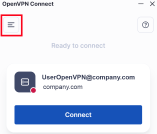
Click the menu icon to display the menu options.
-
Click My Profiles. The My Profiles page displays.
-
Click the blue plus sign button at the bottom of the page to add a user profile.
-
Follow the prompts to configure a new profile.
-
Enter the Digi Axess server URL: https://digiaxess.com
-
Click Continue.
-
In the Username and Password fields, enter your log in credentials for Digi Axess.
-
Click the Connect after import option.
-
Click the Import button. The Enter password dialog displays.
-
Re-enter your Digi Axess password in the Enter password dialog and click Enter.
-
-
The Missing external certificate page displays. You do not need a certificate, so click Cancel. The OpenVPN Connect page displays.
-
Configure the OpenVPN Connect client to disable the certificate option and save your Digi Axess password.
-
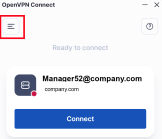
Click the menu icon to display the menu options.
-
Click the My Profiles menu option. The My Profiles page displays.
-
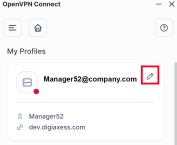
Click the edit icon next to the profile you just created. The profile settings display.
-
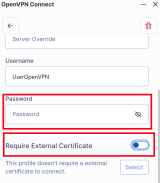
Scroll down until you can see the Password field and the Require External Certificate option.
-
In the Password field, enter your Digi Axesspassword. This ensures that you do not have to enter it every time you launch the client.
-
De-select the Require External Certificate option if it is selected.
-
Click Save Changes.
-
-
The OpenVPN Connect page displays and shows that you are ready to connect.
 PDF
PDF


