Example 1: Administrator user with local authentication
Goal: To create a user with administrator rights who is authenticated locally on the device.

Web
- Log into Digi Remote Manager, or log into the local Web UI as a user with full Admin access rights.
- Access the device configuration:
Remote Manager:
- Locate your device as described in Use Digi Remote Manager to view and manage your device.
- Click the Device ID.
- Click Settings.
- Click to expand Config.
Local Web UI:- On the menu, click System. Under Configuration, click Device Configuration.
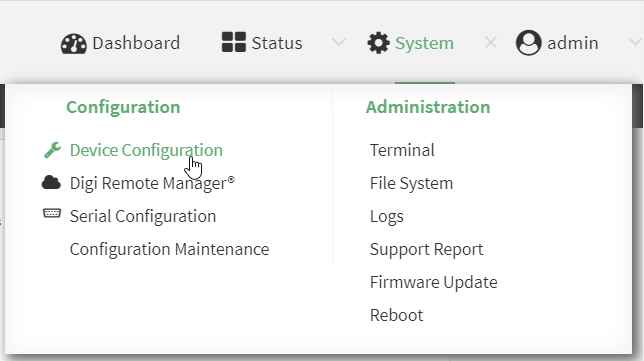
The Configuration window is displayed.
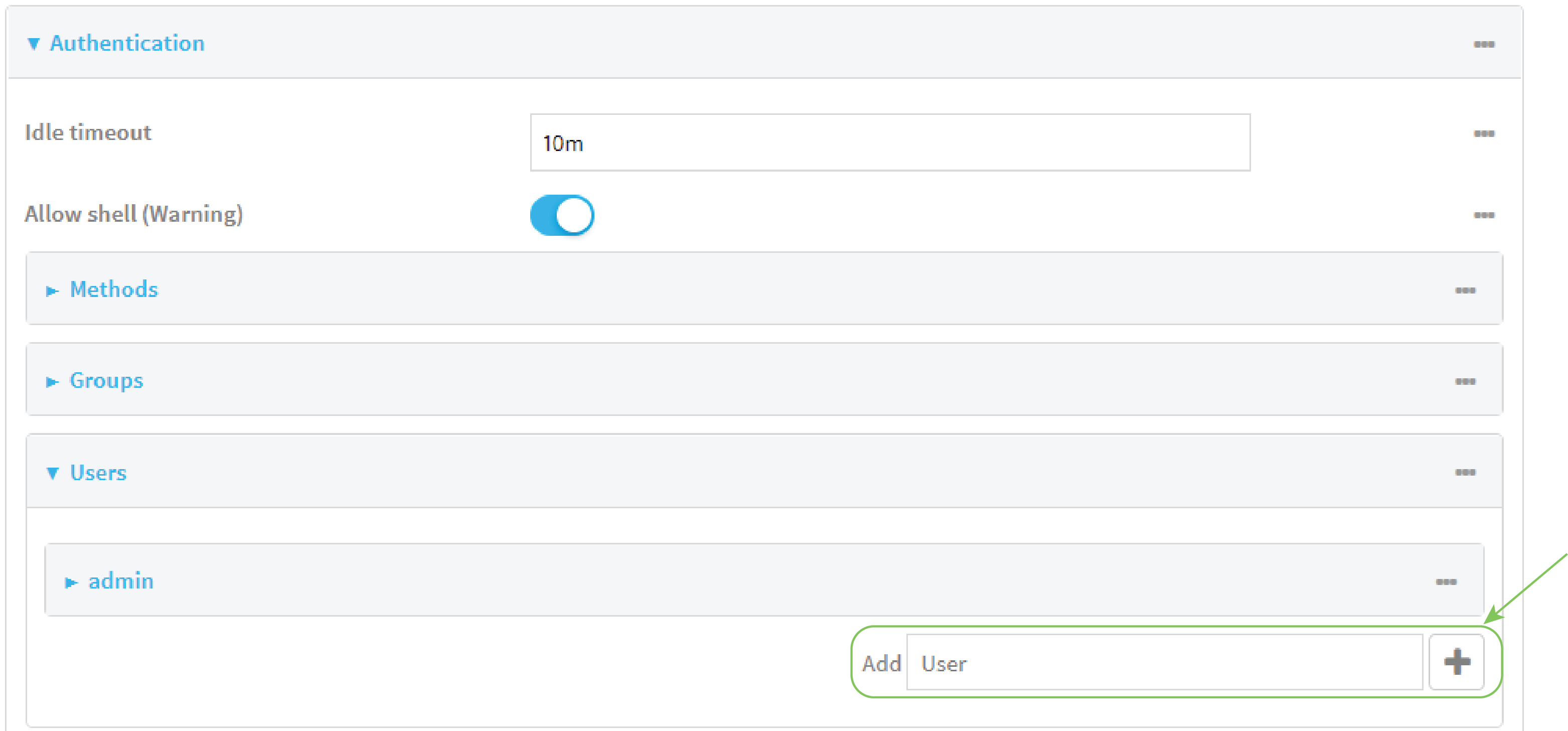
- Click Authentication > Users.
- In Add User: enter a name for the user and click .
The user configuration window is displayed.
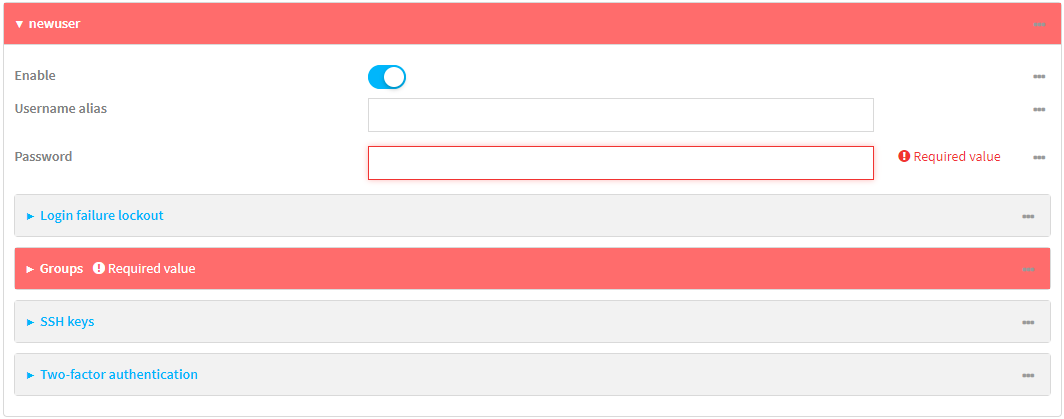
- Enter a Password for the user.
- Assign the user to the admin group:
- Click Groups.
- For Add Group, click .
- For Group, select the admin group.
- Verify that the admin group has full administrator rights:
- Click Authentication > Groups.
- Click admin.
- Verify that the admin group has Admin access enabled. If not, click Admin access to enable.
- Verify that Access level is set to Full access. If not, select Full access.
- Verify that Local users is one of the configured authentication methods:
- Click Authentication > Methods.
- Verify that Local users is one of the methods listed in the list. If not:
- For Add Method, click .
- For Method, select Local users.
- Click Apply to save the configuration and apply the change.
Command line
- Select the device in Remote Manager and click Actions > Open Console, or log into the Connect EZ 16/32 local command line as a user with full Admin access rights.
Depending on your device configuration, you may be presented with an Access selection menu. Type admin to access the Admin CLI.
- At the command line, type config to enter configuration mode:
> config
(config)>
-
Verify that the admin group has full administrator rights:
(config)> show auth group admin acl
admin
	enable true
	level full
...
(config)>
If admin > enable is set to false:
(config)> auth group admin acl admin enable true
(config)>
If admin > level is set to read-only:
(config)> auth group admin acl admin level full
(config)>
-
Verify that local is one of the configured authentication methods:
(config)> show auth method
0 local
(config)>
If local is not listed:
(config)> add auth method end local
(config)>
- Create the user. In this example, the user is being created with the username adminuser:
(config)> add auth user adminuser
(config auth user adminuser)>
- Assign a password to the user:
(config auth user adminuser)> password pwd
(config auth user adminuser)>
- Assign the user to the admin group:
(config auth user adminuser)> add group end admin
(config auth user adminuser)>
- Save the configuration and apply the change.
(config auth user adminuser)> save Configuration saved. > - Type exit to exit the Admin CLI.
Depending on your device configuration, you may be presented with an Access selection menu. Type quit to disconnect from the device.
Example 2: RADIUS, TACACS+, and local authentication for one user
Goal: To create a user with administrator rights who is authenticated by using all three authentication methods.
In this example, when the user attempts to log in to the Connect EZ 16/32 device, user authentication will occur in the following order:
- The user is authenticated by the RADIUS server. If the RADIUS server is unavailable,
- The user is authenticated by the TACACS+ server. If both the RADIUS and TACACS+ servers are unavailable,
- The user is authenticated by the Connect EZ 16/32 device using local authentication.
This example uses a FreeRadius 3.0 server running on ubuntu, and a TACACS+ server running on ubuntu. Server configuration may vary depending on the platforms or type of servers used in your environment.
Web
- Configure a user on the RADIUS server:
- On the ubuntu machine hosting the FreeRadius server, open the /etc/freeradius/3.0/users file:
$ sudo gedit /etc/freeradius/3.0/users
- Add a RADIUS user to the users file:
admin1 Cleartext-Password := "password1"
	Unix-FTP-Group-Names := "admin"
In this example:
- The user's username is admin1.
- The user's password is password1.
- The authentication group on the Connect EZ 16/32 device, admin, is identified in the Unix-FTP-Group-Names parameter.
- Save and close the users file.
- On the ubuntu machine hosting the FreeRadius server, open the /etc/freeradius/3.0/users file:
- Configure a user on the TACACS+ server:
- On the ubuntu machine hosting the TACACS+ server, open the /etc/tacacs+/tac_plus.conf file:
$ sudo gedit /etc/tacacs+/tac_plus.conf
- Add a TACACS+ user to the tac_plus.conf file:
user = admin1 {
	name ="Admin1 for TX64"
	pap = cleartext password1
	service = system {
		groupname = admin
		}
	}
}
In this example:
- The user's username is admin1.
- The user's password is password1.
- The authentication group on the Connect EZ 16/32 device, admin, is identified in the groupname parameter.
- Save and close the tac_plus.conf file.
- On the ubuntu machine hosting the TACACS+ server, open the /etc/tacacs+/tac_plus.conf file:
- Log into Digi Remote Manager, or log into the local Web UI as a user with full Admin access rights.
- Access the device configuration:
Remote Manager:
- Locate your device as described in Use Digi Remote Manager to view and manage your device.
- Click the Device ID.
- Click Settings.
- Click to expand Config.
Local Web UI:- On the menu, click System. Under Configuration, click Device Configuration.
The Configuration window is displayed.
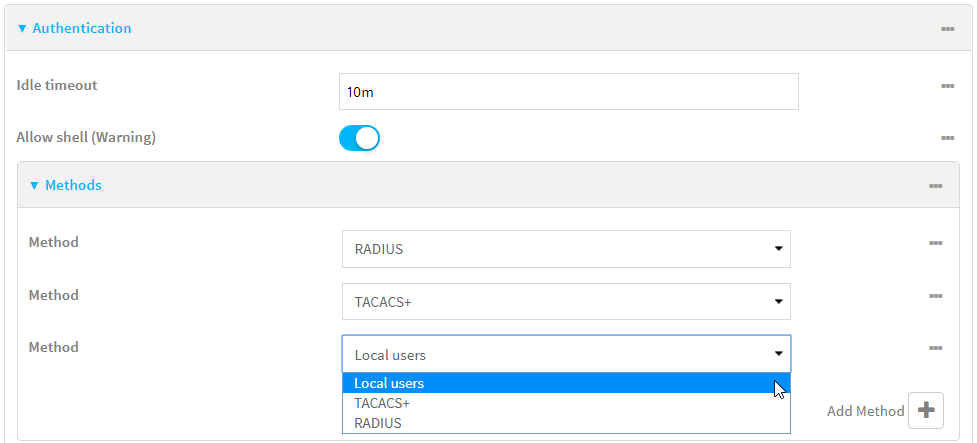
- Configure the authentication methods:
- Click Authentication > Methods.
- For Method, select RADIUS.
- For Add Method, click to add a new method.
- For the new method, select TACACS+.
- Click to add another new method.
- For the new method, select Local users.
- Create the local user:
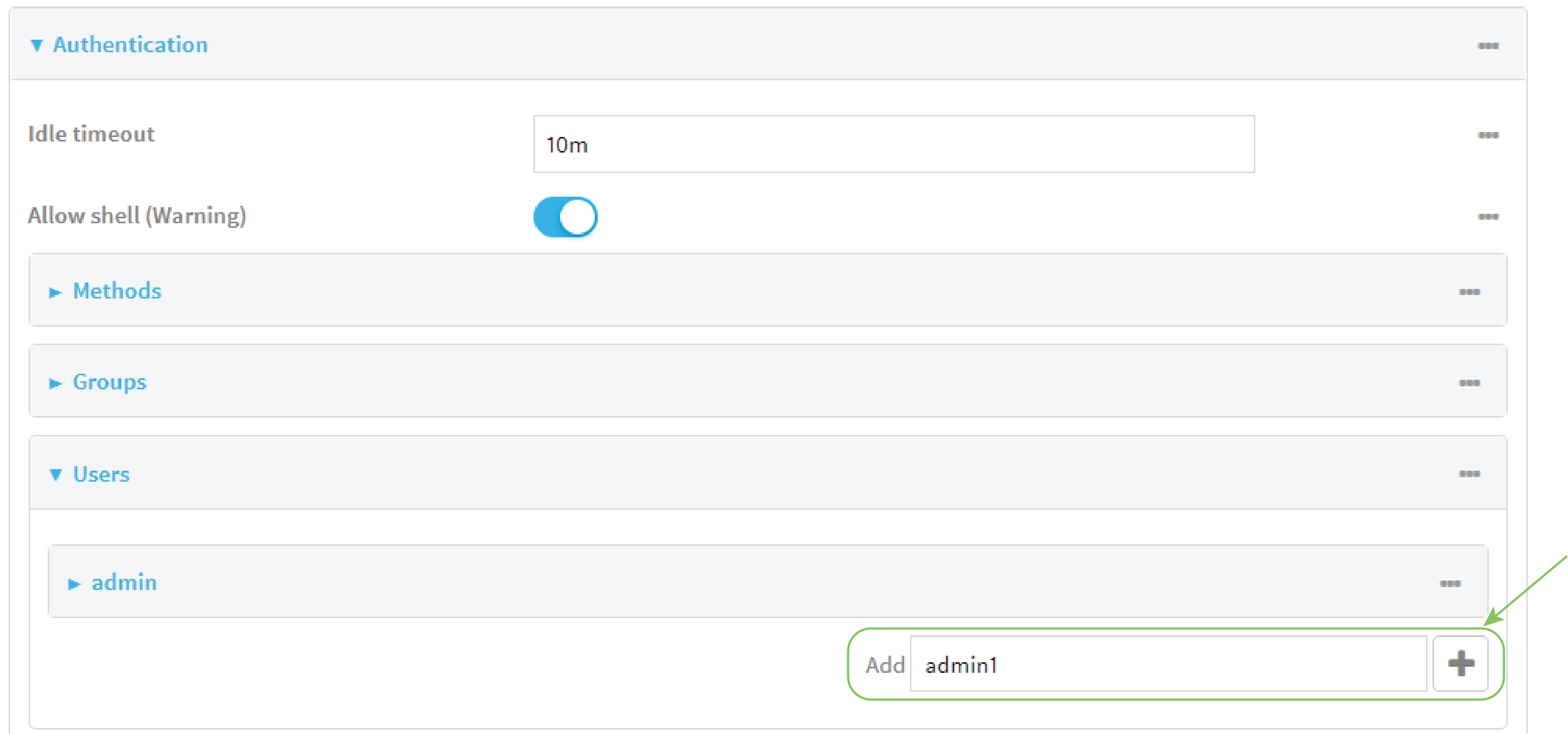
- Click Authentication > Users.
- In Add User:, type admin1 and click .
- For password, type password1.
- Assign the user to the admin group:
- Click Groups.
- For Add Group, click .
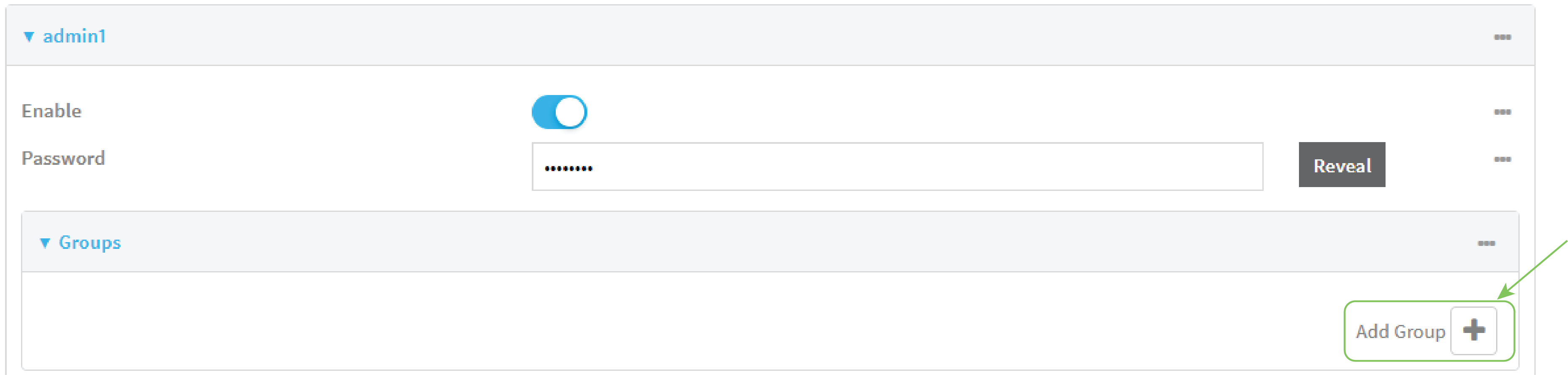
- For Group, select the admin group.

- Verify that the admin group has full administrator rights:
- Click Authentication > Groups.
- Click admin.
- Verify that the admin group has Admin access enabled. If not, click Admin access to enable.
- Verify that Access level is set to Full access. If not, select Full access.
Command line
- Configure a user on the RADIUS server:
- On the ubuntu machine hosting the FreeRadius server, open the /etc/freeradius/3.0/users file:
$ sudo gedit /etc/freeradius/3.0/users
- Add a RADIUS user to the users file:
admin1 Cleartext-Password := "password1"
	Unix-FTP-Group-Names := "admin"
In this example:
- The user's username is admin1.
- The user's password is password1.
- The authentication group on the Connect EZ 16/32 device, admin, is identified in the Unix-FTP-Group-Names parameter.
- Save and close the users file.
- On the ubuntu machine hosting the FreeRadius server, open the /etc/freeradius/3.0/users file:
- Configure a user on the TACACS+ server:
- On the ubuntu machine hosting the TACACS+ server, open the /etc/tacacs+/tac_plus.conf file:
$ sudo gedit /etc/tacacs+/tac_plus.conf
- Add a TACACS+ user to the tac_plus.conf file:
user = admin1 {
	name ="Admin1 for TX64"
	pap = cleartext password1
	service = system {
		groupname = admin
		}
	}
}
In this example:
- The user's username is admin1.
- The user's password is password1.
- The authentication group on the Connect EZ 16/32 device, admin, is identified in the groupname parameter.
- Save and close the tac_plus.conf file.
- On the ubuntu machine hosting the TACACS+ server, open the /etc/tacacs+/tac_plus.conf file:
- Select the device in Remote Manager and click Actions > Open Console, or log into the Connect EZ 16/32 local command line as a user with full Admin access rights.
Depending on your device configuration, you may be presented with an Access selection menu. Type admin to access the Admin CLI.
- At the command line, type config to enter configuration mode:
> config
(config)>
- Configure the authentication methods:
- Determine the current authentication method configuration:
(config)> show auth method
0 local
(config)>
This output indicates that on this example system, only local authentication is configured.
- Add RADIUS authentication to the beginning of the list:
(config)> add auth method 0 radius
(config)>
- Add TACACS+ authentication second place in the list:
(config)> add auth method 1 tacacs+(config)>
- Verify that authentication will occur in the correct order:
(config)> show auth method
0 radius
1 tacacs+
2 local
(config)>
- Determine the current authentication method configuration:
-
Verify that the admin group has full administrator rights:
(config)> show auth group admin acl
admin
	enable true
	level full
...
(config)>
If admin > enable is set to false:
(config)> auth group admin acl admin enable true
(config)>
If admin > level is set to read-only:
(config)> auth group admin acl admin level full
(config)>
- Configure the local user:
- Create a local user with the username admin1:
(config)> add auth user admin1
(config auth user admin1)>
- Assign a password to the user:
(config auth user adminuser)> password password1
(config auth user adminuser)>
- Assign the user to the admin group:
(config auth user adminuser)> add group end admin
(config auth user adminuser)>
- Create a local user with the username admin1:
- Save the configuration and apply the change.
(config auth user adminuser)> save Configuration saved. > - Type exit to exit the Admin CLI.
Depending on your device configuration, you may be presented with an Access selection menu. Type quit to disconnect from the device.
 PDF
PDF


