AnywhereUSB Manager USB Device Status pane
When you select a USB device in a group in the AnywhereUSB Manager, information about the device displays in the Device Status pane.
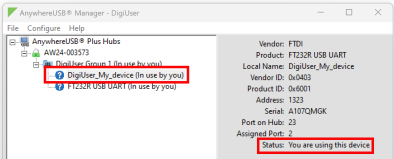
| Label | Description |
|---|---|
| Vendor |
Name of the USB device vendor, if supplied by the device. |
| Product | Name of the USB product, if supplied by the device. |
| Local Name |
A descriptive local name for the USB device. The local name also displays in the tree view in the left-hand pane in the AnywhereUSB Manager. The local name is local to the computer on which the AnywhereUSB Manager is running. You can change the local name using the Assign a Local Name menu option for the device. See Assign a local name to a USB device. |
| Vendor ID | The USB vendor ID. |
| Product ID | The USB product ID. |
| Address | The USB device address that helps to identify a device. |
| Serial | The serial number of the USB device, if supplied by the device. |
|
Port on Hub |
The number of the port on the Hub to which the USB device is connected. |
| Assigned Port |
The Windows address assigned to the virtual port. See Assign Device Address (use the same virtual port number). |
| Status |
A status message indicates whether a user is currently using this device. Options are:
|
 PDF
PDF


