IX40 serial port connector
The IX40 is a DTE serial device capable of supporting the RS-232, RS-422, or RS-485 electrical signaling modes. The IX40 default mode is RS-232.
Pinout schematic and pin functions
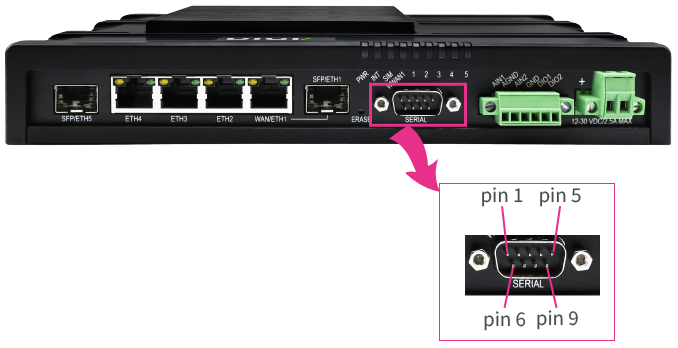
 RS-232 pin functions
| DB9 pin | Pin direction | Function |
|---|---|---|
| 1 | Input | DCD |
| 2 | Input | RxD |
| 3 | Output | TxD |
| 4 | Output | DTR |
| 5 | Ground | |
| 6 | Input | DSR |
| 7 | Output | RTS |
| 8 | Input | CTS |
| 9 | Input | RI |
RS-422 pin functions
| DB9 pin | Pin direction | Function |
|---|---|---|
| 1 | Input | CTS- |
| 2 | Input | RXD+ |
| 3 | Output | TXD+ |
| 4 | Output | RTS- |
| 5 | Ground | |
| 6 | Input | RXD- |
| 7 | Output | RTS+ |
| 8 | Input | CTS+ |
| 9 | Output | TXD- |
RS-485 pin functions
| DB9 pin | Pin direction | Function |
|---|---|---|
| 1 | ||
| 2 | Input/Output | High (internally connected to pin 3) |
| 3 | Input/Output | High (internally connected to pin 2) |
| 4 | ||
| 5 | Ground | |
| 6 | Input/Output | Low (internally connected to pin 9) |
| 7 | ||
| 8 | ||
| 9 | Input/Output | Low (internally connected to pin 6) |
Change the signaling mode
To change the signaling mode:
Web
- Log into Digi Remote Manager, or log into the local Web UI as a user with full Admin access rights.
- Access the device configuration:
Remote Manager:
- Locate your device as described in Use Digi Remote Manager to view and manage your device.
- Click the Device ID.
- Click Settings.
- Click to expand Config.
Local Web UI:- On the menu, click System. Under Configuration, click Device Configuration.
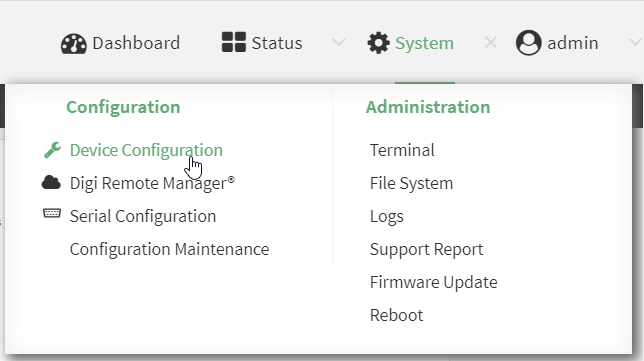
The Configuration window is displayed.
- Click Serial > Port 1.
- For Electrical signaling mode, select
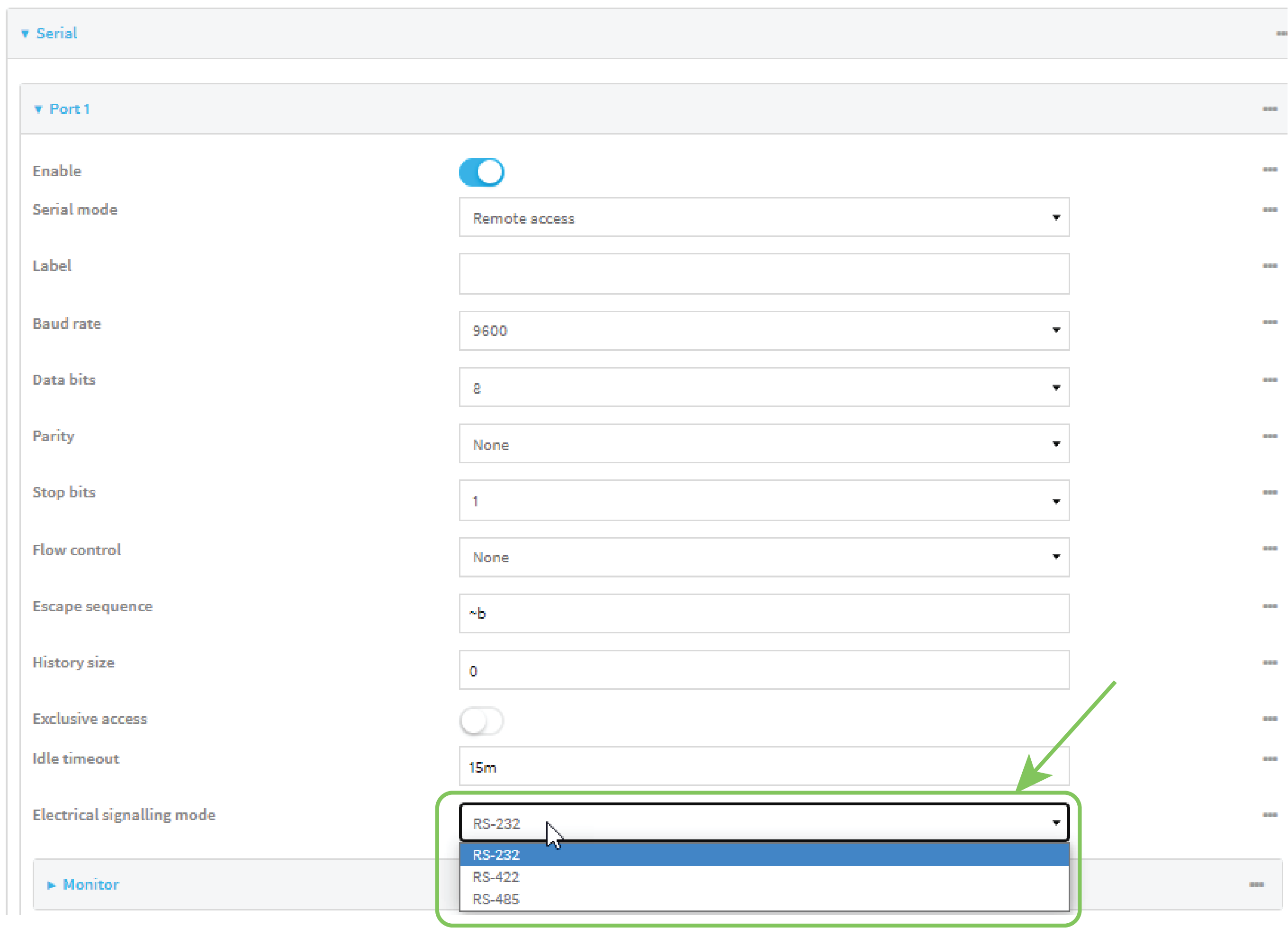
- Click Apply to save the configuration and apply the change.
Command line
- Select the device in Remote Manager and click Actions > Open Console, or log into the IX40 local command line as a user with full Admin access rights.
Depending on your device configuration, you may be presented with an Access selection menu. Type admin to access the Admin CLI.
- At the command line, type config to enter configuration mode:
> config
(config)>
- Set the signaling mode:
(config)> serial port1 signal_mode
where value is one of:
rs-232
rs-422
rs-485
(config)> serial port1 termination true
(config)>
- Save the configuration and apply the change.
(config)> save Configuration saved. > - Type exit to exit the Admin CLI.
Depending on your device configuration, you may be presented with an Access selection menu. Type quit to disconnect from the device.
 PDF
PDF


