Register a Z45 Controller
Your device must be registered with Digi Axess so that you can access and manage the device from Digi Axess. The process uses the device's IMEI or serial number as a unique identifier.
Note You can also register devices from the Devices page.
Before you begin
You will need this information to register your device:
-
Serial number (preferred) or IMEI
-
The device group in which the device should be included.
To register your device:
-
Access the Digi Axess Register Device page.
-
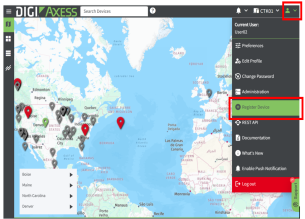
In the toolbar, click the down arrow next to the user profile icon. The Account menu displays.
-
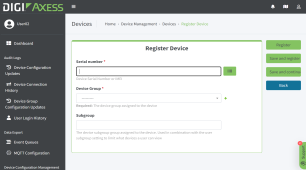
Click Register Device. The Register Device page displays.
-
-
In the Serial Number field, enter the unique identifier for the device. You can enter the device's serial number or IMEI. As an alternative, click the Scan Barcode button next to the field and use a camera or a saved image to enter an identifier.
-
From the Device Group list box, select a device group from the drop-down list.
-
(Optional) In the Subgroup field, enter a subgroup name.
-
Click Register.
 PDF
PDF


