Manage the list of devices configured for RealPort
After you have enabled and configured RealPort on at least one Digi device, a list of configured devices displays at the bottom of the Digi Navigator. You can refresh the list and easily access the COM port configuration on your computer.
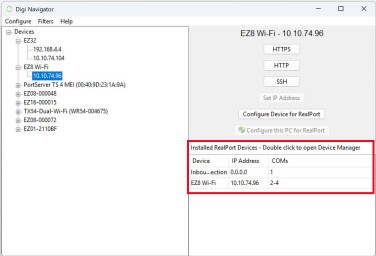
| Item | Description |
|---|---|
|
Installed RealPort devices |
A subset of the list of the devices available to Digi Navigator that are configured for RealPort serial port mode display in the Installed RealPort devices section. This section is outlined in red the graphic. |
|
Access the COM ports configured for RealPort |
You can review the COM ports on your computer that have been configured for RealPort serial port mode access from the Installed RealPort devices section in Digi Navigator. |
|
Refresh the RealPort installed device list |
You can refresh the list of devices displayed in the Installed RealPort devices section. From the toolbar, choose Configure > Refresh Installed RealPort Device List. |
|
Uninstall the RealPort configuration on your computer |
You can use the Uninstall Device option to remove the RealPort device configuration on your computer for a selected device. This ensures that your computer is not able to connect to the selected device. |
 PDF


