Configure the WireGuard VPN
Your LR54 device supports using WireGuard VPN. You can configure the device for either client or server mode. For client mode, your LR54 is establishing an outbound WireGuard VPN connection to the WireGuard server. For server mode, your LR54 is acting as a WireGuard server and accepts incoming WireGuard VPN connections from one or more client devices.
Required configuration items
For client modeYou need the following information from the WireGuard server:
|
For server modeYou need the following information:
|

Web
- Log into Digi Remote Manager, or log into the local Web UI as a user with full Admin access rights.
- Access the device configuration:
Remote Manager:
- Locate your device as described in Use Digi Remote Manager to view and manage your device.
- Click the Device ID.
- Click Settings.
- Click to expand Config.
Local Web UI:- On the menu, click System. Under Configuration, click Device Configuration.
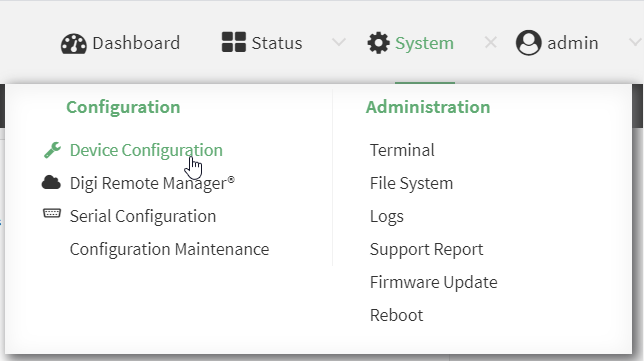
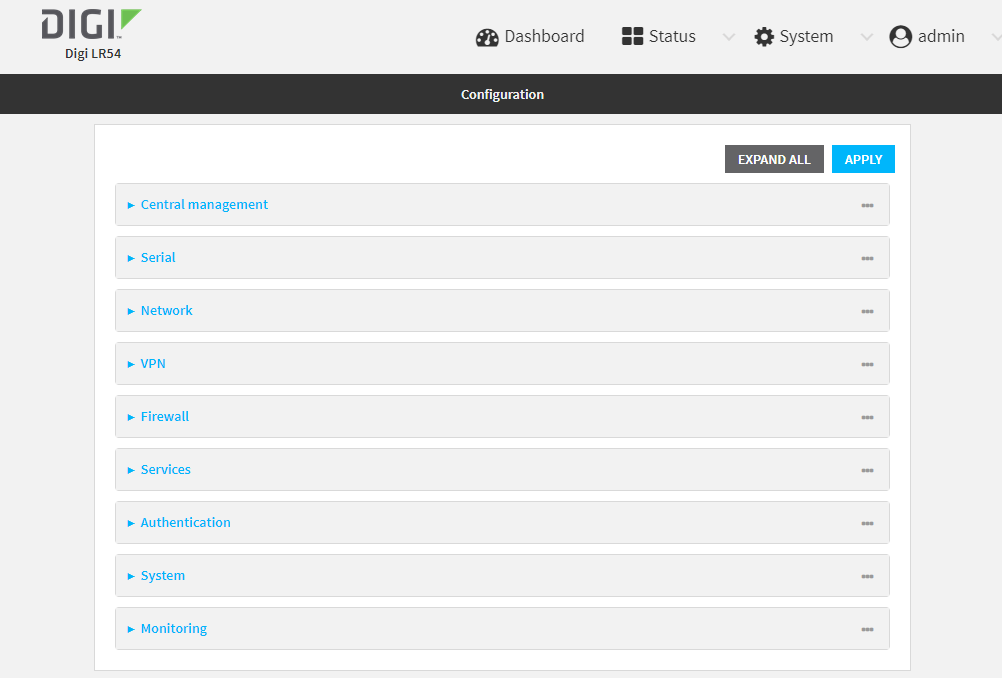
The Configuration window is displayed.
-
Navigate to VPN > WireGuard > WireGuard tunnel.
-
Click to add a new WireGuard tunnel.
-
Type a name for the tunnel.
-
Click OK.
The settings for your new tunnel appear.
-
Modify the settings.
Tunnel setting UI Configuration Enable The new tunnel is enabled by default. It can be disabled if the tunnel is being set up for future use or if you want to stop the tunnel while testing other configuration changes. Peers
-
Click to add a new peer.
-
If this LR54 is the WireGuard client, then only add one peer. The peer is the remote Wireguard server to which it connects.
-
If this LR54 is the WireGuard server, add one or more peers. The peer(s) are the remote WireGuard clients that will connect to this device.
-
-
Configure the settings for the new peer(s).
If the new peer is to act as the WireGuard server, make sure to configure the following settings:
-
[Remote] Public key
-
[Remote] Pre-shared key (optional)
-
[Remote] Allowed addresses: Only traffic destined for an IP address added here is sent to this peer.
-
[Remote] Endpoint address
-
[Remote] Endpoint port
If the new peer is to act as a remote WireGuard client, make sure to configure the following settings:
-
[Client] Public key
-
[Client] Pre-shared key (optional)
-
[Local and Remote] Allowed addresses
-
Device managed private key Enable to allow the LR54 to generate its own public and private keys. If this setting is enabled, it triggers the LR54 to automatically generate a private key and corresponding public key. This private and public key is used to establish the encrypted communication between the client and peer via the Wireguard tunnel. To see the public key, navigate to Status > VPN > WireGuard.
Private key Type the private key for the Wireguard tunnel, if the Device managed private key setting is disabled.
Endpoint port The WireGuard connection value of 51820 is populated by default.
-
- Click Apply to save the configuration and apply the change.
Command line
- Select the device in Remote Manager and click Actions > Open Console, or log into the LR54 local command line as a user with full Admin access rights.
Depending on your device configuration, you may be presented with an Access selection menu. Type admin to access the Admin CLI.
- At the command line, type config to enter configuration mode:
> config
(config)>
- Save the configuration and apply the change
(config vpn iptunnel gre_example)> save Configuration saved. > - Type exit to exit the Admin CLI.
Depending on your device configuration, you may be presented with an Access selection menu. Type quit to disconnect from the device.
-
At the command line, type VPN to enter configuration mode for VPN:
 > config vpn
(config vpn)>
-
Type wireguard to enter configuration mode for WireGuard.
 > config vpn wireguard
(config vpn wireguard)>
- The table below lists the required settings for creating and configuring a client WireGuard tunnel.
-
Determine if the LR54 will act as a client or server.
-
If this LR54 is the WireGuard client, then only add one peer. The peer is the remote Wireguard server to which it connects.
-
If this LR54 is the WireGuard server, add one or more peers. The peer(s) are the remote WireGuard clients that will connect to this device.
-
-
Create the peer(s).
(config)> vpn wireguard name add peer
(config)>
-
[Remote] Public key
(config)> vpn wireguard name peer public_key
(config)>
-
[Remote] Pre-shared key (optional)
(config)> vpn wireguard name peer psk
(config)>
-
[Remote] Allowed addresses: Only traffic destined for an IP address added here will be sent to this peer.
(config)> vpn wireguard name peer overlay
(config)>
-
[Remote] Endpoint address
(config)> vpn wireguard name peer endpoint
(config)>
-
[Remote] Endpoint port
(config)> vpn wireguard name peer port
(config)>
-
[Client] Public key
(config)> vpn wireguard name peer public_key
(config)>
-
[Client] Pre-shared key (optional)
(config)> vpn wireguard name peer psk
(config)>
-
[Local and Remote] Allowed addresses
| Configuration | Description |
|
add |
Add a new WireGuard tunnel. > config vpn wireguard add name (config)> Where name is the name of the new WireGuard tunnel. |
|
enable |
The WireGuard tunnel is enabled by default. You may want to temporarily disable the tunnel while it is being set up, for future use, or if you want to stop the tunnel while testing other configuration changes. To disable: (config)> vpn wireguard name enable false (config)> To enable: (config)> vpn wireguard name enable true (config)> |
|
peer |
For a peer that acts as the remote Wireguard server, configure the following settings:
For the a peer(s) that acts as the remote WireGuard client, configure the following settings:
|
|
autogenerate |
Enable to allow the LR54 to generate its own public and private keys. If this setting is enabled, it triggers the LR54 to automatically generate a private key and corresponding public key. To enable: > config vpn wireguard add name autogenerate true (config)> To disable: > config vpn wireguard add name autogenerate true (config)> |
|
port |
The WireGuard connection value of 51820 is populated by default. (config)> vpn wireguard name port (config)> |
|
private-key |
Type the private key for the Wireguard tunnel, if the Device managed private key setting is disabled. > config vpn wireguard add name private key value (config)> With value being a 32-byte string encoded in base 64. |
 PDF
PDF


