Low voltage shutdown
The XBee 3 Cellular LTE-M/NB-IoT can monitor the XBee VCC line in order to detect a failing power supply. Monitoring the VCC line can prevent possible memory corruption on both the cellular modem and the file system due to insufficient power. This feature is recommended for users who run the XBee off of a battery.
You must first enable this feature and then set a base threshold for the voltage on the XBee VCC line. When the voltage falls below the base threshold, the XBee goes into a shutdown state. When in a shutdown state:
- The cellular modem will be shut down completely, halting any network activity.
- The file system will be shut down completely, disallowing any file system operations.
Once in this state, the XBee will resume normal functionality only after a reset. A reset is triggered if the voltage rises above an upper threshold set by a combination of values.
Note The XBee VCC voltage gets read periodically, once every two minutes. Consequently, it may take up to two minutes to change to or from a shutdown state.
Enable and configure the low voltage shutdown feature
- Enable the feature by setting the DO command bit 4.
- Set the base threshold for the voltage on the XBee VCC line using the %L command. When the voltage for the XBee VCC line goes below the base threshold, the XBee goes into a shut down state.
- Set the reset offset for the XBee VCC line using the %M command. The XBee resets and resumes normal operation when the voltage reaches the base threshold set in the %L command, plus the value of the reset offset set in the %M command.
Example
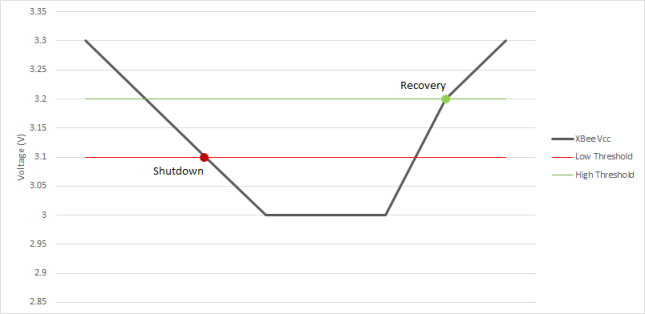
The graph shown below demonstrates this feature. In this example, AT%L (Base Threshold) is set to 0xC1C (3100 mV) and AT%M (Reset Offset) is set to 0x64 (100 mV).
- After the XBee VCC voltage drops below the base threshold of 3100 mV (set by AT%L), the XBee goes into the shutdown state.
- When in the shutdown state, the XBee VCC voltage must rise 100 mV (set by AT%M) above the shutdown voltage (AT%L) to reset and then resume normal operation.
 PDF
PDF


